
Programmatic SEO and Dynamic Landing Pages with Clay, Supabase, and Bubble.io
The power of AI web scrapers and no code tools

Last month, I met with an aspiring entrepreneur. We discussed the merits of her business idea, and she also showed me a side project she had previously developed: a site highlighting the Happy Hour specials available in New York City. While her site was well-built, it was also manually coded. As a result, her content was not only likely to become stale very quickly (especially for something as transient as Happy Hour specials) but also would be time-consuming and cumbersome to update.
This got me thinking, “How best could you build a site with the most up-to-date Happy Hour information that could easily be updated once that information changes?” I was inspired to spend a few days building a basic site using a combination of Clay, Supabase, and Bubble.io that would meet both of these needs. In this article, I walk through the step-by-step process I used to build the site and discuss other cool project ideas around programmatic SEO and dynamic landing pages. Anyone not interested in reading the full article can find a summary here.
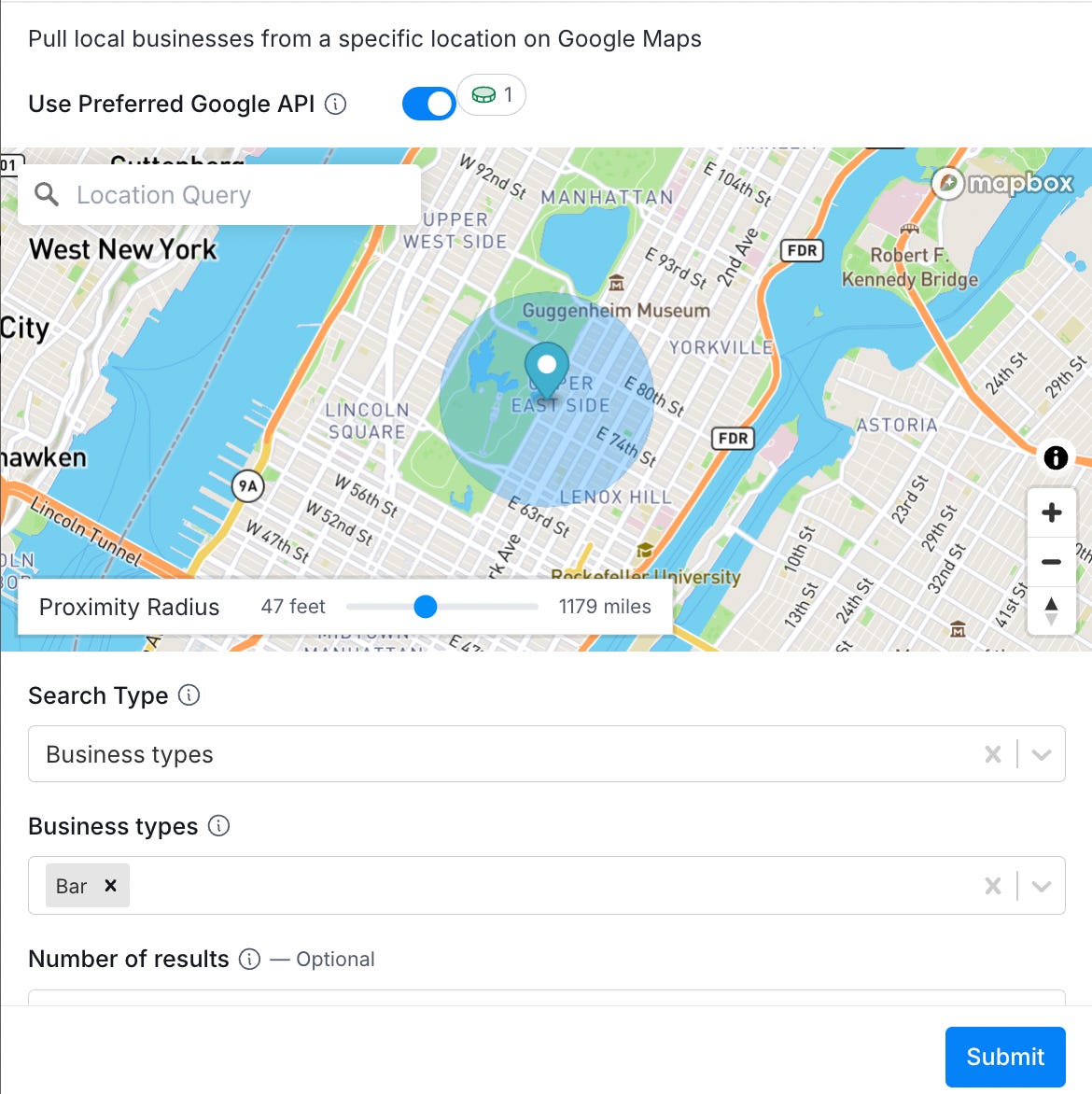
Step #1 - Pull NYC Bars Into Clay
Pulling down local bars from Google Maps into your Clay table is straightforward using Clay’s direct Google Maps integration (example below).
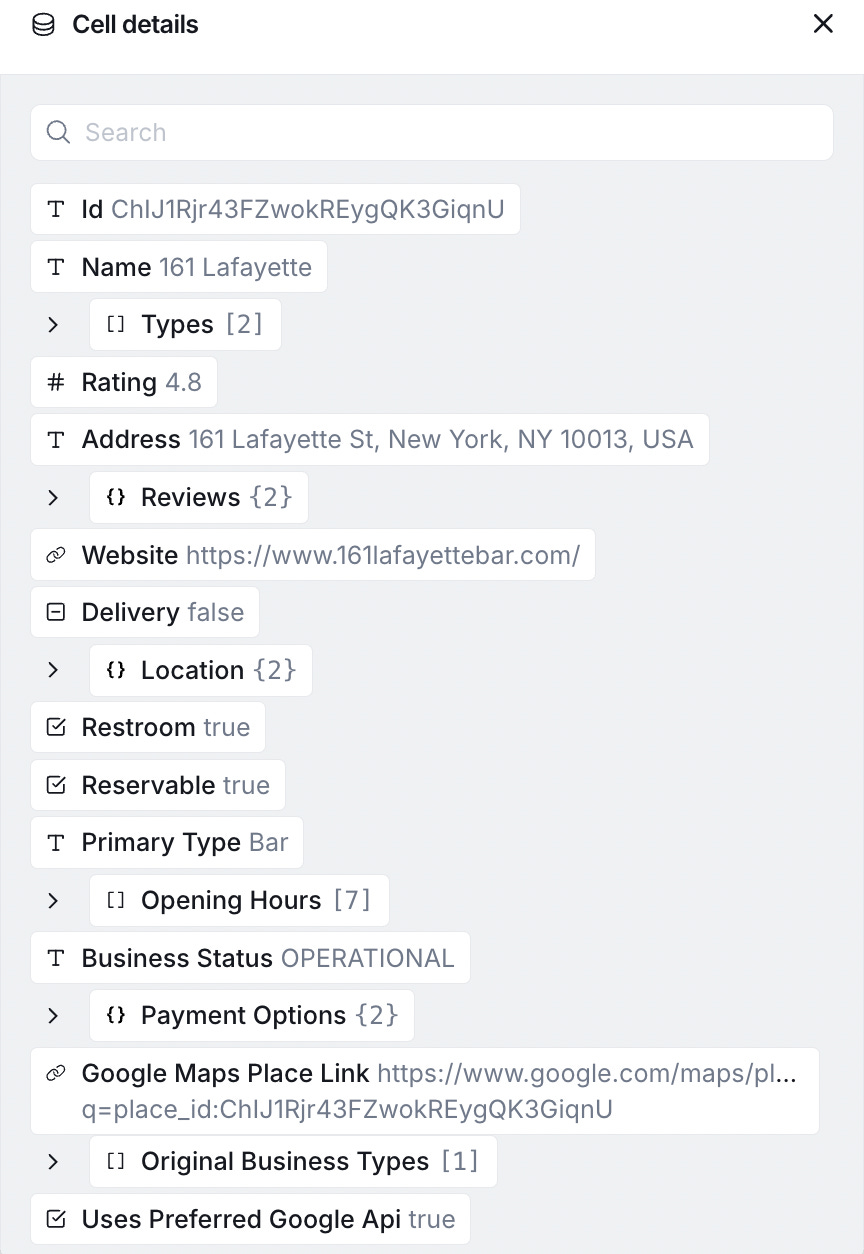
Once that information is pulled down (example below), you can select the fields you want and create a unique column for each.
Step #2 - Use Claygent To Find Happy Hour Information
Clay’s proprietary AI agent, Claygent, is one of its coolest features. Using Claygent, I was able to scan each bar’s website and Google search results to identify whether a Happy Hour special existed and, if so, what the special was, along with what days and times it was being offered.
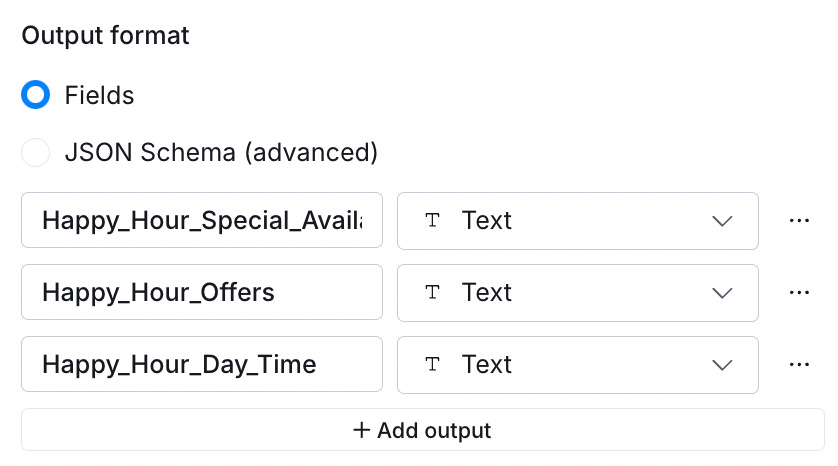
The prompt I used to do this can be found here. As usual, bolded values mean I’m referencing a column from my Clay table. One final suggestion: structure the output into three values so that you can easily pull each into its own column: “Happy_Hour_Special_Available,” “Happy_Hour_Offers,” and “Happy_Hour_Day_Time.”
Step #3 - Set Up An Account With Supabase and Set Up Your Supabase Table
Anyone who has ever set up a database from scratch knows how much of a hassle it can be. There are frequently challenges with initializing the database, starting the server, and logging in and out of the database, which is cumbersome, and all updates need to be made with raw SQL, which has a fairly steep learning curve. Supabase solves all that. With Supabase, you can easily spin up a database on the cloud, modify your table as quickly as updating an Excel file, and connect your database to external services.
For step #3, I created a Supabase table with the following fields (these are all values from my Clay table that I want to use for my website):
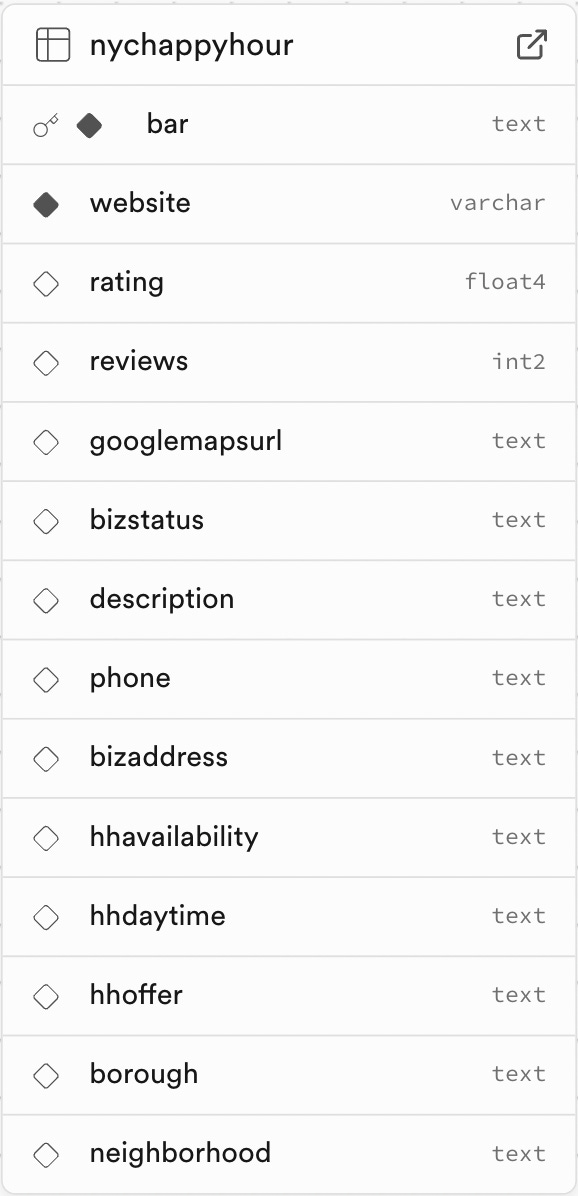
If I later want to modify or delete data from my table, I can simply click on rows and select the desired command.
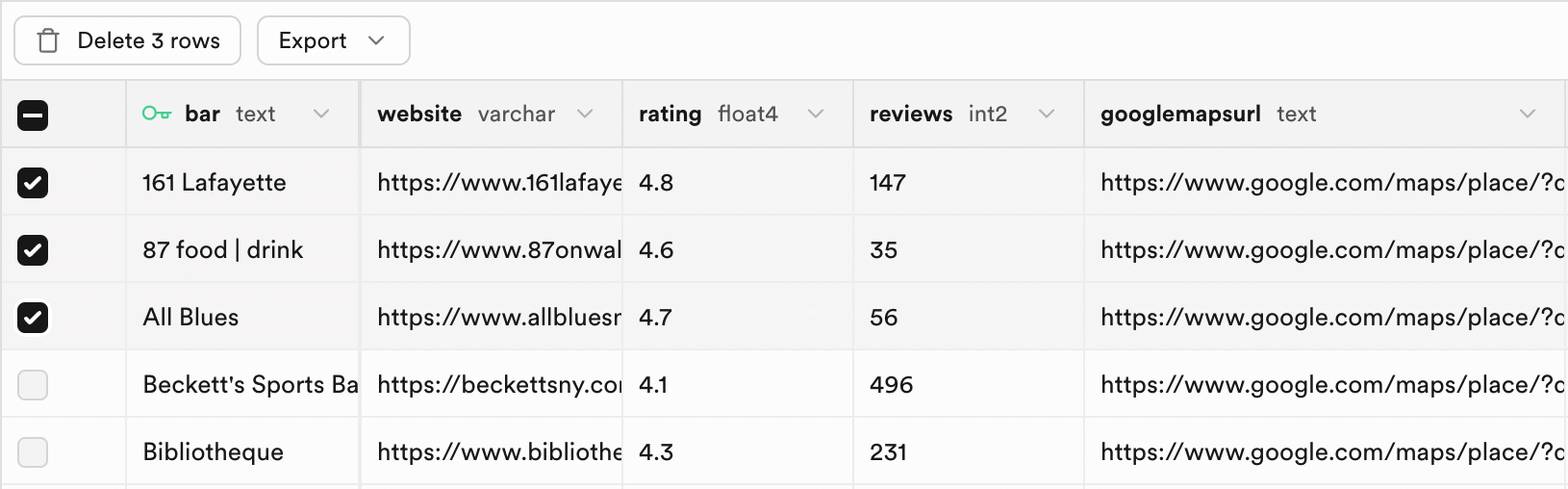
Step #4 - Pass Data From My Clay Table Into Supabase
Once the Supabase table is set up, it is pretty easy to route data from your Clay table into your Supabase table using Clay’s HTTP API functionality.
“An API! I’m non-technical!” you say. Not a problem. Only three core parts to this API call are required, and if you run into any bumps along the way, Chat-GPT can quickly help you get unstuck. Those three parts are:
1). Endpoint and Method
The Endpoint specifies where you are connecting, and the Method specifies what action you intend to take. Supabase uses a standardized endpoint, and the only customizations you need to make are inserting your project name and table name (as shown in the screenshot below).
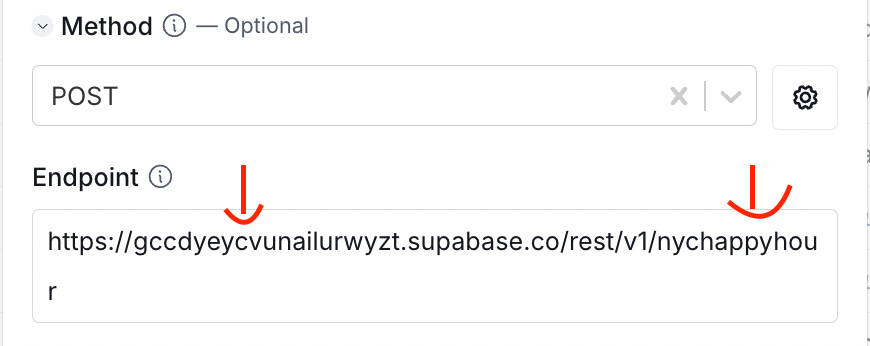
There are two primary methods used in the vast majority of API or database calls: “GET” and “POST.” GET requests involve pulling down data from an API or database, while POST requests involve submitting data to an API or database. Since we are sending data from our Clay table to Supabase, this would be a POST request.
2). Body
The Body is where you write what data you are going to send to your API or database. In this specific case, I need to do field mapping. In the example below, the green text refers to the name of the column in Supabase, and the text after the ‘:’ is the data that I am seeking to enter into the database. Each value that I selected here references a column from my Clay table.
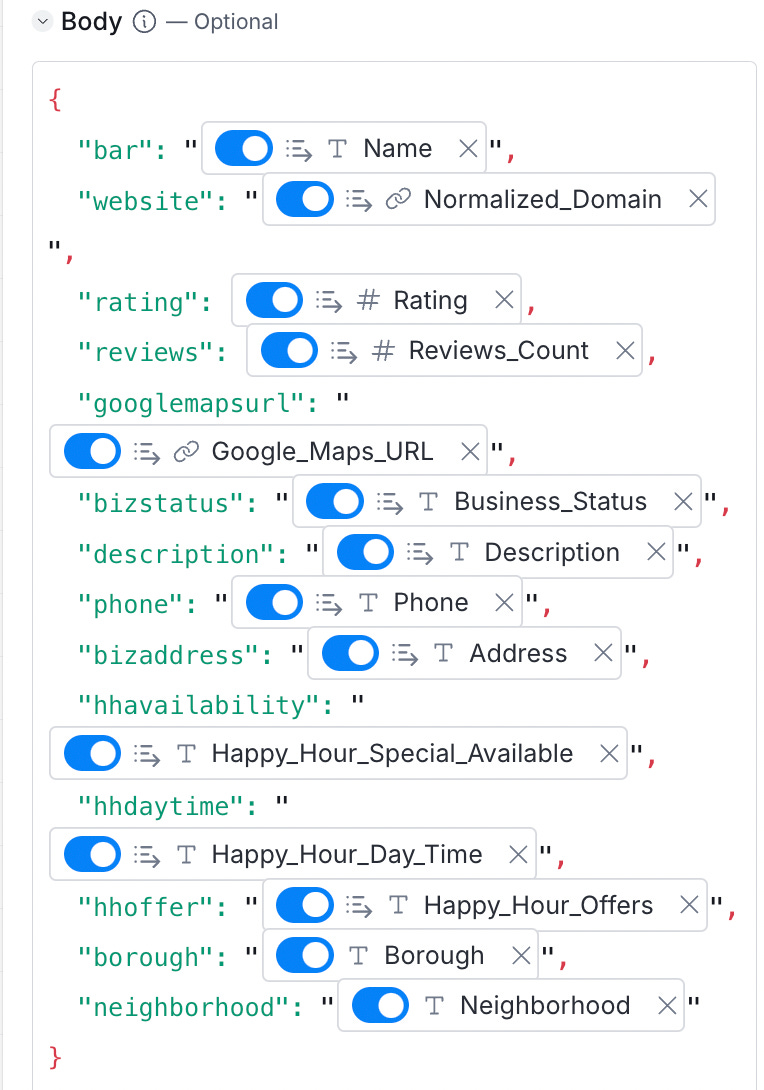
3). Headers
In API or database calls, Headers control permission-ing. By referencing a specific API token that you have been granted by the platform (in this case, Supabase), you enable the platform to monitor your API activity and ensure that strangers cannot access or mess with your data. Regarding what to put for the Headers in this specific instance, Chat-GPT gave me the answer (although most API calls have nearly identical Headers). The structure of my Headers are shown below, although I have hidden the full API keys to protect my data.
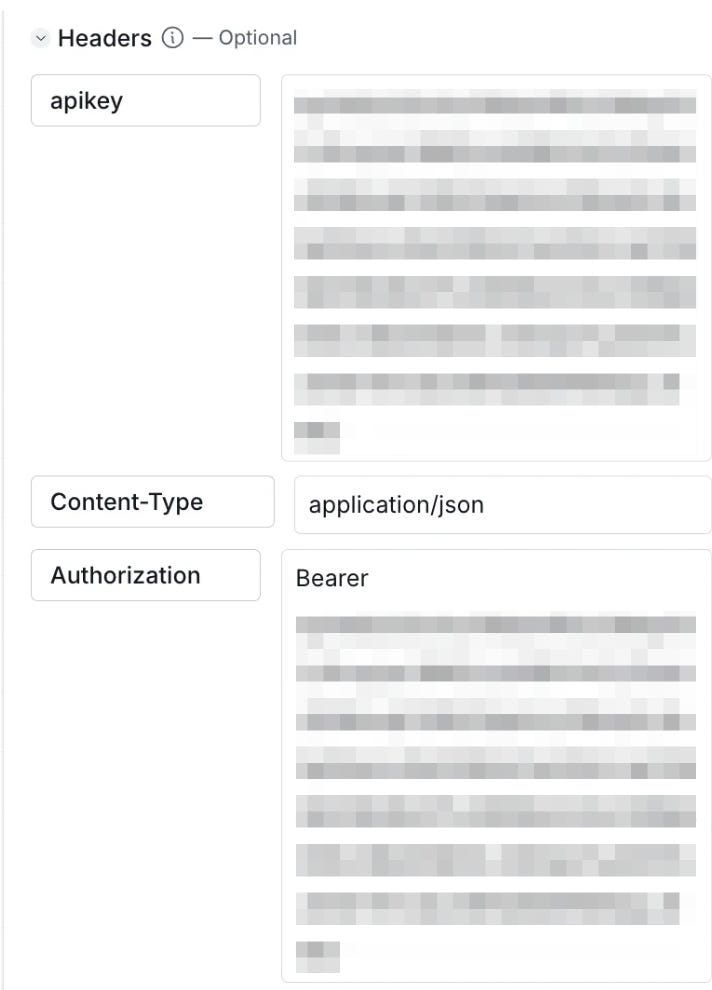
Two final notes to highlight around the API calls:
1). To leverage Clay’s HTTP API functionality, you must be on their Explorer plan ($350 / month) or higher. If you’re instead on the Starter plan ($150 / month), you are better off using Clay’s direct integration with PostgreSQL, another database provider that’s a bit more complicated to work with.
2). When considering the overall structure of your project, you should create a column for filtering your dynamic pages. For my project, it was “Neighborhood” since that is how I intend to organize my data and categorize it into various pages.
Step #5 - Pass Data From Supabase to Bubble.io
Bubble.io’s Plugin section allows for HTTP API calls, enabling you to follow a similar process to what was required to send data from Clay to Supabase. The difference in this case is that since you pull data down from Supabase, this will be a GET request instead of a POST. Below are 5 API calls I set up, each pulling data down for a specific New York City neighborhood. There were only 5 neighborhoods in the data I pulled down from Clay, but a complete app would have 30+ neighborhoods in Manhattan alone.
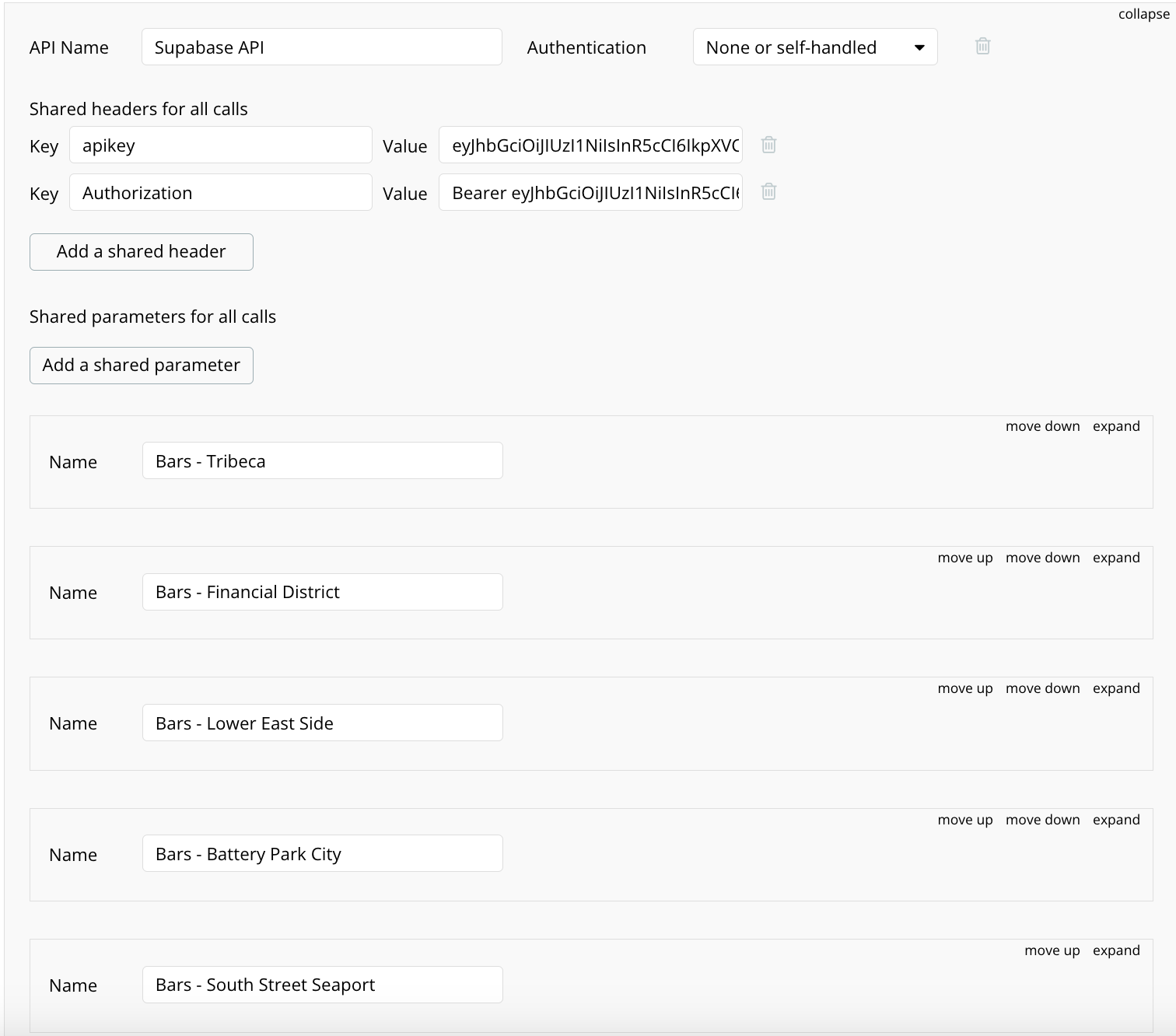
To ensure each call pulled down the appropriate neighborhood, I adjusted the endpoint below (the ‘%20’ is how spaces are represented).
https://gccdyeycvunailurwyzt.supabase.co/rest/v1/nychappyhour?neighborhood=eq.Tribeca&bizstatus=eq.OPERATIONAL
https://gccdyeycvunailurwyzt.supabase.co/rest/v1/nychappyhour?neighborhood=eq.Financial%20District&bizstatus=eq.OPERATIONAL
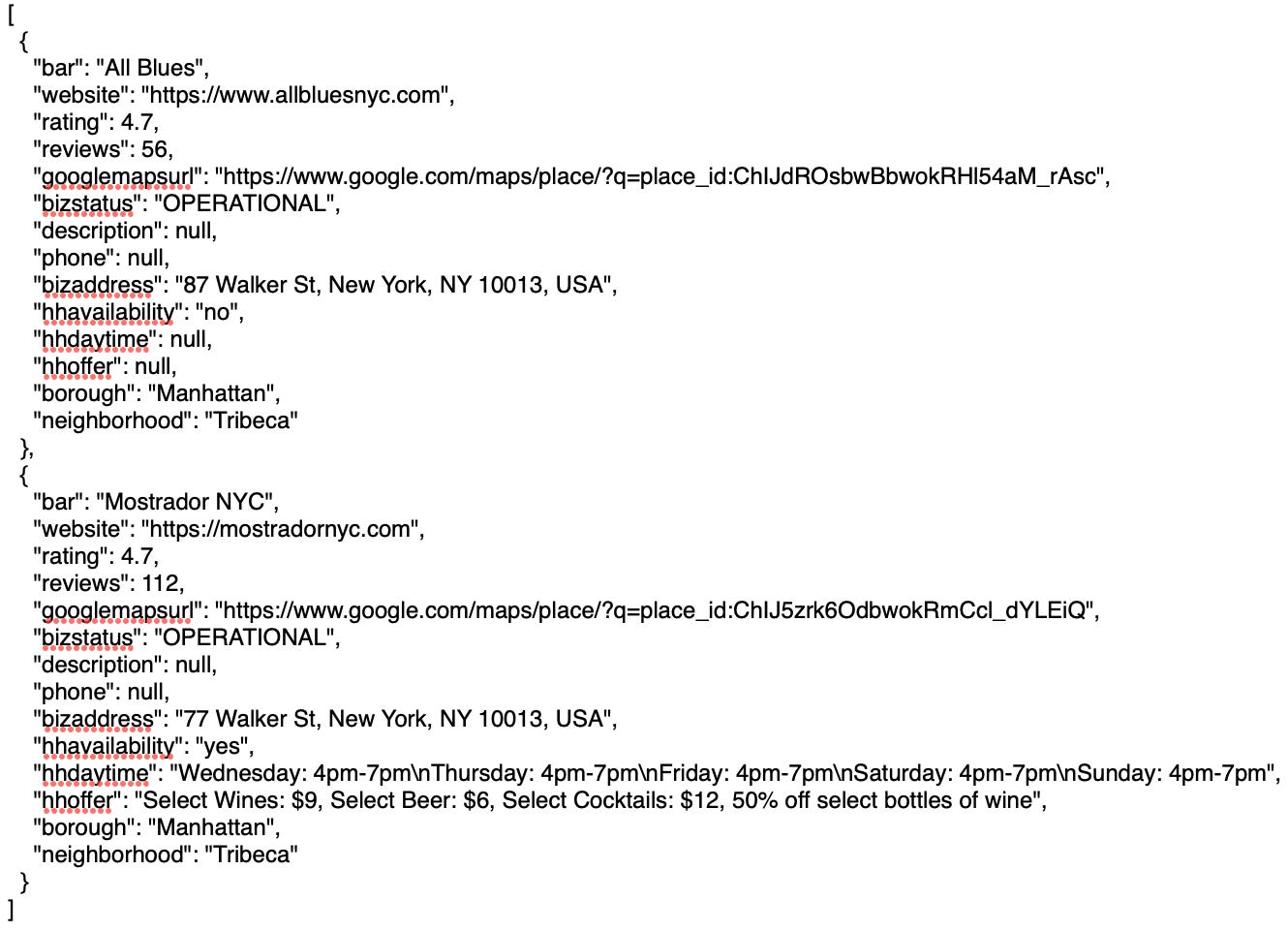
An example of the data that gets sent to Bubble.io is here:
Step #6 - Create a New Data Type in Bubble.io
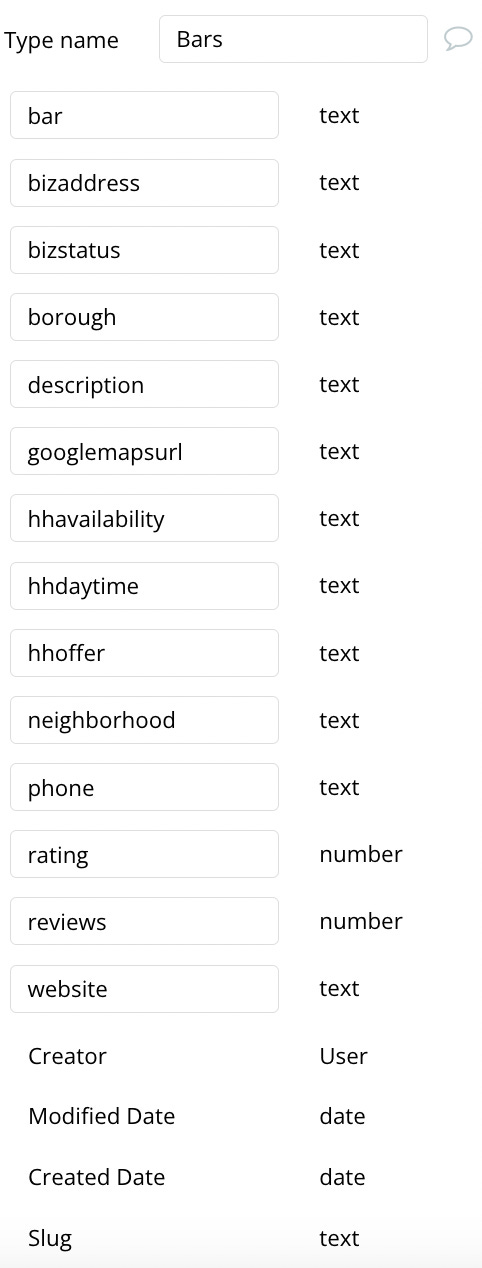
Like when we initially set up our Supabase database, we need to create a new data type in Bubble.io that corresponds to the data we just passed in. To do this, go to the Data tab and make the appropriate fields to match what is in your database (there are a few pre-defined Bubble.io fields, but you can ignore these):
Step #7 - Design Your Pages With the Dynamic Data
Now that the data flows to Bubble.io, we are all set to populate our pages with dynamic data. I followed a simple structure for my V1 app: a single ‘main’ page with links to the five neighborhood sub-pages. I am pretty new to Bubble.io, and design is not my strong suit, so I made a very basic page that can be seen below.
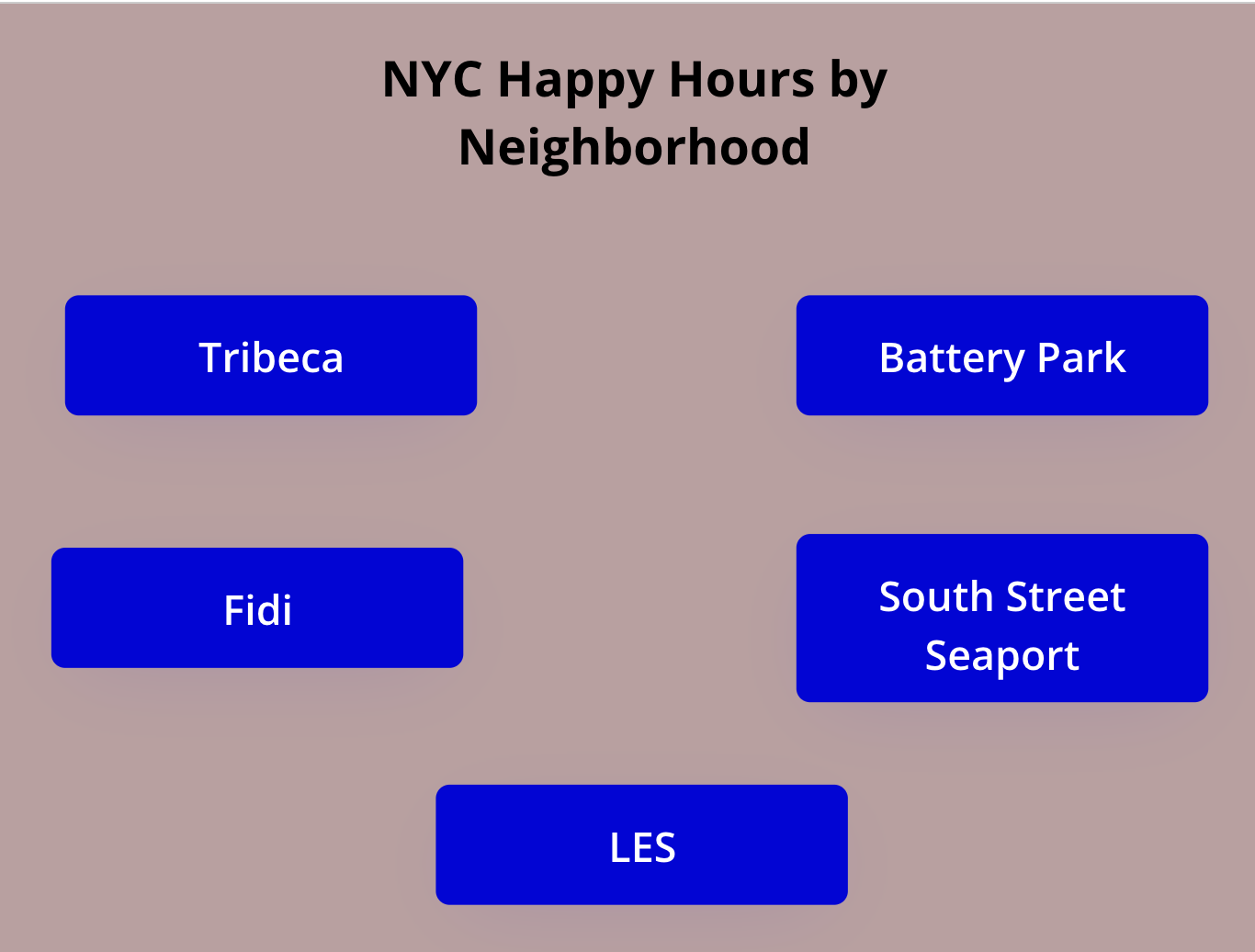
I configured each button in Bubble.io’s “Workflow” section so that when users click on it, they are sent to the appropriate page along with the data for the respective API call (e.g. Clicking on the Tribeca button will send data about Tribeca bars to the next page).
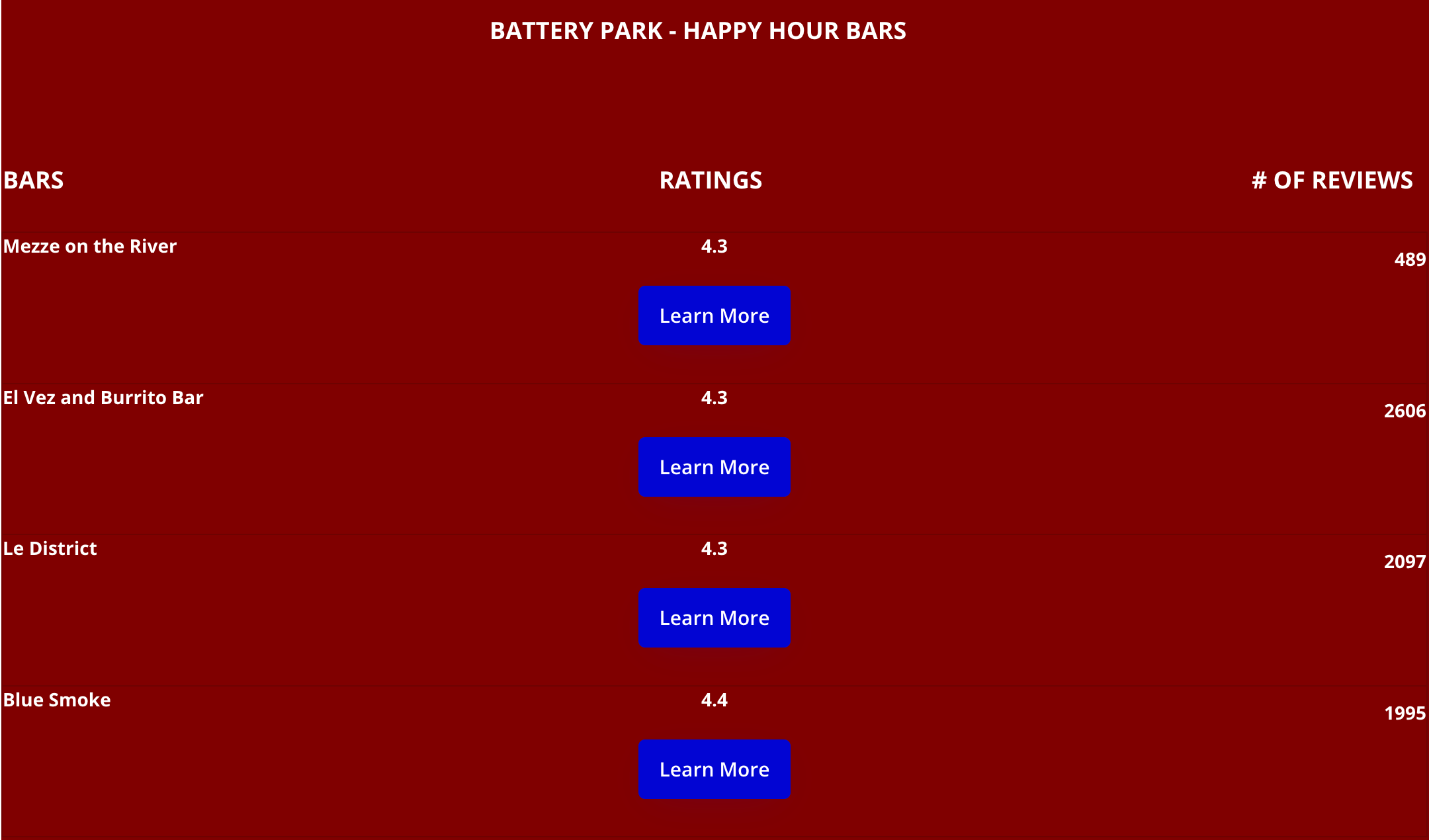
Next, I configured each individual page to pull down the bars offering Happy Hours in each neighborhood, along with a button linking to that bar’s website if the visitor wants to know more. Below is my first super rough draft (clicking the ‘Learn More’ button takes you to each bar’s website).
Current State and Next Steps
While the current V1 of the site is not the prettiest, my intention was to create a first draft that successfully sent data from Clay to Bubble.io and displayed it dynamically on a page. For my V2, I am actively working with a skilled Bubble.io designer to:
-Create nicer-looking pages.
-Add additional columns to the pages, highlighting the Happy Hour specials and day and time.
-Create unique SEO-optimized URLs for each page.
-Launch a live app.
This project is just one example of how Clay, Supabase, and Bubble.io can be used to create dynamic landing pages well-tailored for programmatic SEO. Other interesting use cases include:
#1 - Developing destination-specific pages for travelers based on popular search queries. For example, a travel agency builds pages like "Best Beaches in [Country]" or "Luxury Hotels in [City]."
#2 - Building pages around symptoms, treatments, or local healthcare providers. For example, a healthcare platform creates pages like "Chiropractors Specializing in Back Pain in [City]."
#3 - Showcasing listings for specific neighborhoods, property types, or price ranges. For example, a real estate platform creates pages like "2-Bedroom Apartments in [Neighborhood] under $1,000,000."
Conclusion
Creating a dynamic, easily updatable Happy Hour site inspired this project, but the potential applications for tools like Clay, Supabase, and Bubble.io extend far beyond that. If you’ve been searching for a scalable way to deliver real-time, targeted information to your audience, this guide offers a practical starting point and plenty of inspiration. I will provide an update once I have a functional V2 of the app, and it should have a much sleeker design and some new bells and whistles.
If you liked this content, please click the <3 button on Substack so I know which content to double down on.
TLDR Summary
The article demonstrates how to build a dynamic, easily updatable website using Clay, Supabase, and Bubble.io. The example project tracks and displays Happy Hour specials in New York City, but the techniques discussed have broader applications for programmatic SEO and dynamic landing pages.
Key Lessons and Strategies:
Step-by-Step Process to Build a Dynamic Website
Step 1: Pull NYC Bar Data into Clay
Used Clay’s Google Maps integration to extract bar information, including location and contact details.
Step 2: Use Claygent to Gather Happy Hour Information
Claygent, Clay’s AI-powered agent, scanned each bar’s website and Google search results for Happy Hour details (e.g., times, days, offers) and structured the output into separate columns for easy integration.
Step 3: Set Up a Supabase Table
Supabase simplifies database management, allowing easy setup, updates, and data connections without requiring SQL expertise.
Step 4: Transfer Data from Clay to Supabase
Used Clay’s HTTP API functionality to pass data from Clay into Supabase, mapping fields like bar names, neighborhoods, and Happy Hour details.
Step 5: Transfer Data from Supabase to Bubble.io
Bubble.io’s Plugin section enabled HTTP API calls to fetch data (GET requests) for specific neighborhoods dynamically.
Step 6: Create a Data Type in Bubble.io
Configured Bubble.io’s Data tab to structure incoming data for dynamic use.
Step 7: Design Pages with Dynamic Data
Built basic pages in Bubble.io to display bar details for each neighborhood, linking to individual websites for more information.
Key Considerations for Building and Scaling the Site
Data Filtering: Created filters (e.g., by neighborhood) to organize data into dynamic pages.
API Integration: Used clear Endpoints, Headers, and Body mappings for seamless data transfers between platforms.
Page Design: Focused on functional layouts for the V1 app, with plans to improve visual design and SEO optimization in V2.
Workflow Automation: Configured workflows in Bubble.io to ensure seamless navigation between pages.
Applications for Programmatic SEO and Dynamic Landing Pages
The methodology has potential for other use cases, such as:
Travel Agencies: Building location-specific pages like "Best Beaches in [Country]" or "Luxury Hotels in [City]."
Healthcare Platforms: Showcasing local providers with pages like "Chiropractors Specializing in Back Pain in [City]."
Real Estate Sites: Creating property-specific pages like "2-Bedroom Apartments in [Neighborhood] under $1,000,000."
Key Takeaways:
Clay streamlines data extraction and enrichment, reducing manual effort.
Supabase provides an easy-to-use cloud database for storing and updating data dynamically.
Bubble.io enables no-code development of websites with data-driven pages, allowing for quick updates and scalability.
Practical Applications: The tools and methods are ideal for programmatic SEO, delivering personalized, real-time content to users.
This is cool! Thanks for sharing your process and steps too!