
Building a Custom Lead Scoring Solution with N8N, Apify, and OpenAI
Automation born from limitation

My day-to-day sales work at Relentless is hectic, and at times, I need to make quick decisions about which calls to prioritize and which to reschedule. To make these kinds of decisions effectively, it’s imperative that I have some way to assign a lead score, but, there are two challenges:
#1 - We don’t ask for prospect’s LinkedIn profiles upfront
#2 - LinkedIn profiles can’t be fed directly into AI models for evaluation
For point one, our team has made the decision in our funnel not to ask for LinkedIn profiles, as we’re worried it may lower booking rates. For point two, if you’ve ever tried to feed a LinkedIn profile directly into ChatGPT or another LLM, you’re all too familiar with the following message.

In this article, I walk through a workflow I setup in N8N to find a prospect’s LinkedIn profile, analyze it, and then assign a lead score to that lead. Anyone not interested in reading the full article can find a summary here. You can also see the workflow in action in the video below.
Step 1: Pull Relevant Leads from Google Calendar into Google Sheet
For the first step, I pull relevant leads (i.e. filtered by date and meeting type) from my Google Calendar into my Google Sheet. To achieve this, I developed a different N8N workflow (shown below), which does the following:
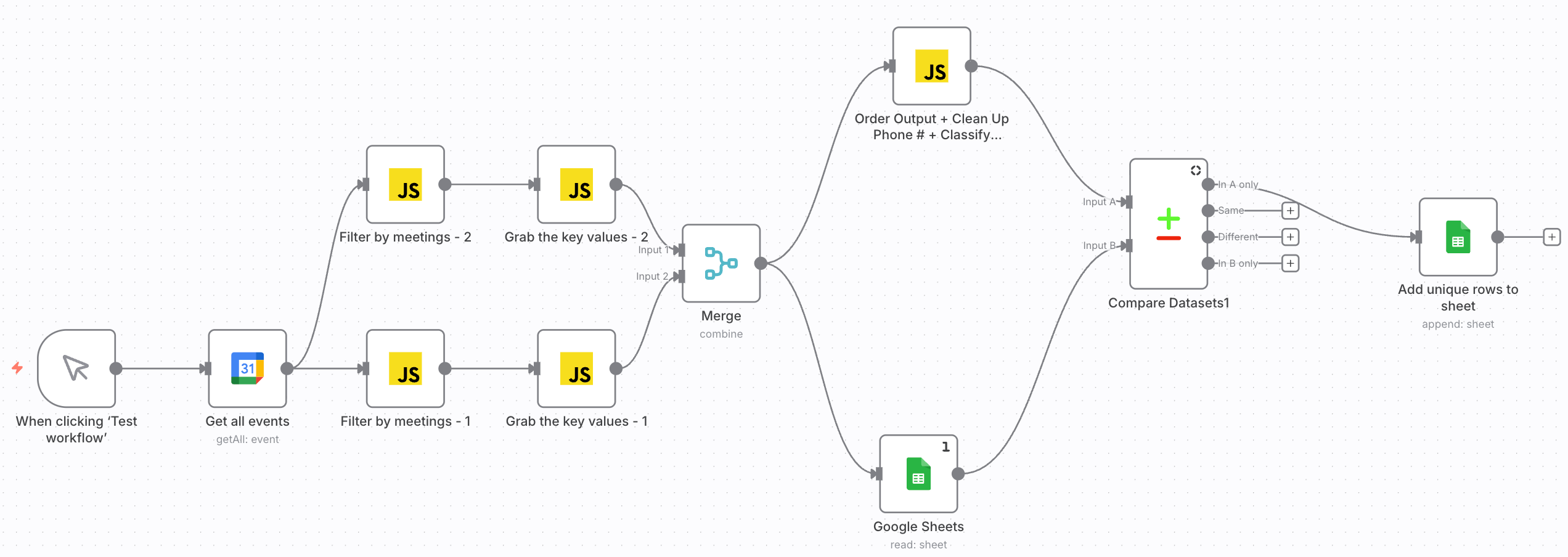
#1 - Filters by Date.
#2 - Pulls out my sales calls; skips over other meetings.
#3 - Grab the relevant information for each call.
#4 - If the meeting already exists in the Google Sheet, skip over it.
#5 - Otherwise, add a new row to the Google Sheet.
When run successfully, this flow will add a new row to my Google Sheet like the following (personal info redacted):

Step 2: Use SERP API to find LinkedIn profiles
It’s relatively easy to search for and locate a single LinkedIn profile using a Google Search, but if you wanted to find 10+ LinkedIn profiles quickly, you need another solution. I did an API call to Google’s Search API (called the SERP API) and asked it to search, “[Full Name] LinkedIn site:linkedin.com/in” and return the top 3 results.
The best part of the SERP API? It’s free to sign-up, and you get 250 free API calls per month.
Step 3: Add LinkedIn Profile to Google Sheet
This one’s fairly straightforward: I use an N8N code node to extract the Full Name and LinkedIn Profile URL from the SERP API call, and then I add this information to my Google Sheet. Now, the “linkedInProfileUrl” column in my Google Sheet is fully populated.
Step 4: Use Apify to Extract the Data from the LinkedIn Profile
As discussed in the introduction, the primary frustration that led me to create this workflow is that you can’t feed a LinkedIn profile to an AI model and expect it to analyze it. Instead, you must feed structured data to the model for it to draw proper conclusions. Apify is a web scraping marketplace I’m a big fan of, and they have a variety of scrapers you can rent for this purpose.
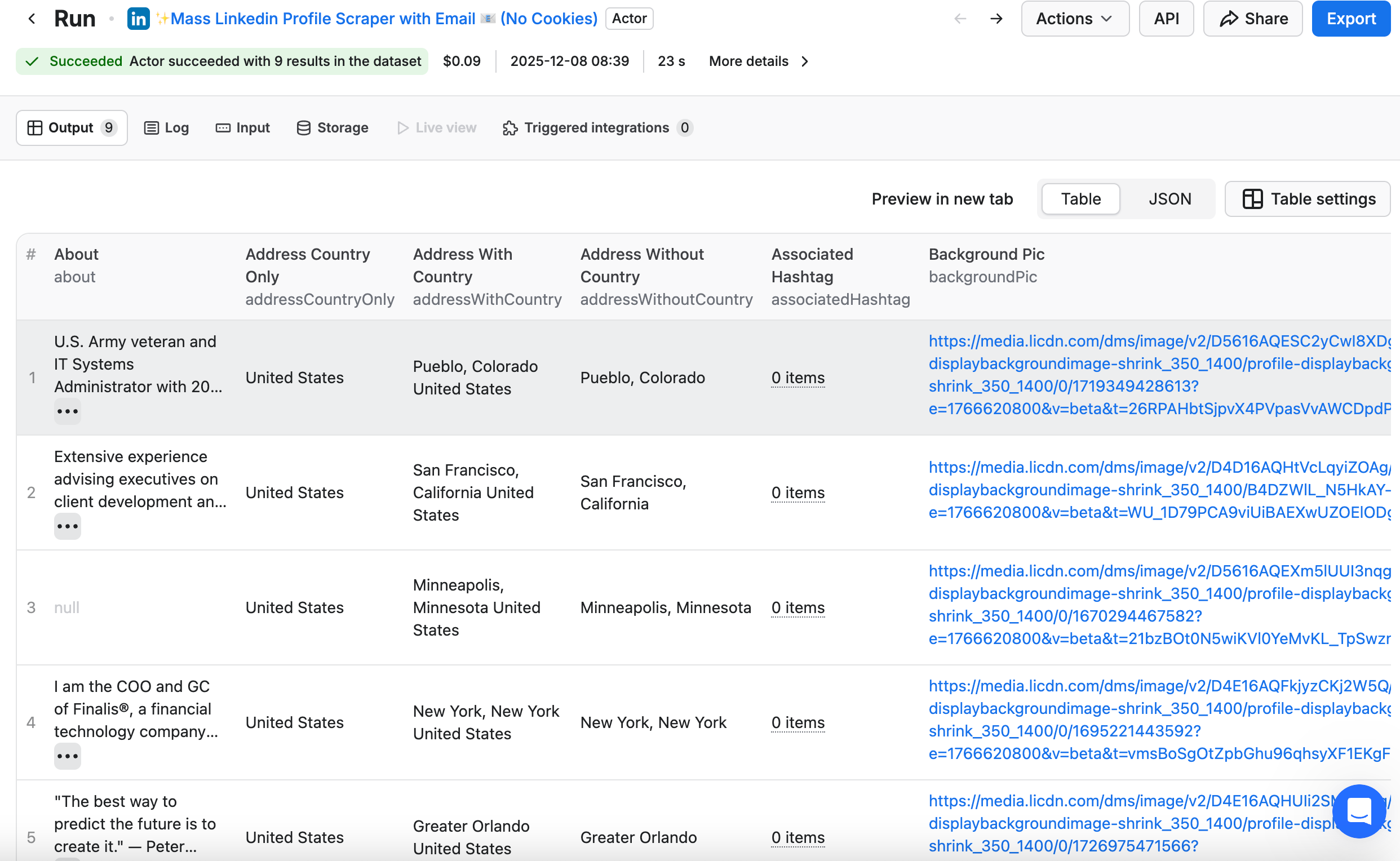
I did an API request to the scraper, “Mass Linkedin Profile Scraper with Email 📧 (No Cookies)”, fed in a list of LinkedIn profile URLs, and received back a ton of useful information scraped from each profile (sample below).
Step 5: Pull out the Relevant Info from Apify Output
As useful as Apify is, they spit back an outrageous amount of LinkedIn profile data. If I fed all of it into an OpenAI API request, it would easily exceed the token limit and the request would fail. Thus, I first need to extract the relevant data that I want from the call, which I will then feed into my API request. The data I chose to extract can be found below.
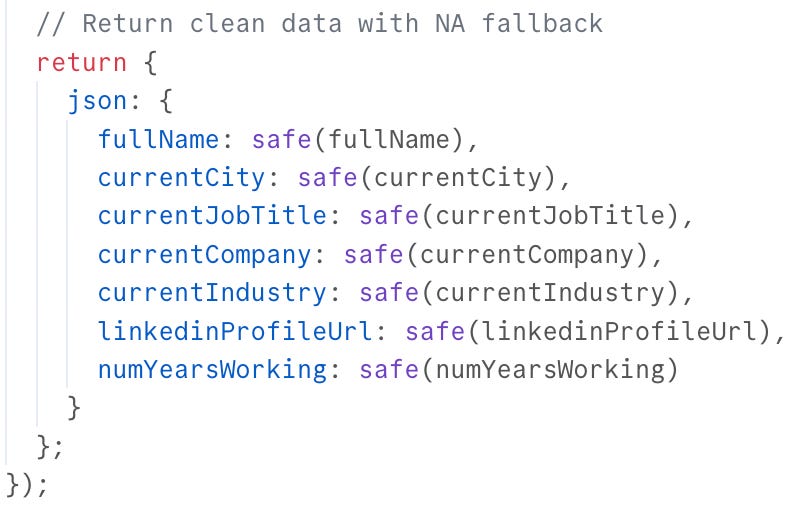
Two things to note:
#1 - This is the end of my code block, but there are ~ 100 lines of code to properly extract all of this data from the Apify output. ChatGPT wrote all of this code for me with some simple prompting.
#2 - Most of these values are pulled straight off the LinkedIn profile and are fairly simple to extract. numYearsWorking was a value I created by pulling the first and last year’s of work experience on the resume and subtracting them.
Step 6: Estimate the Lead’s Income w/OpenAI
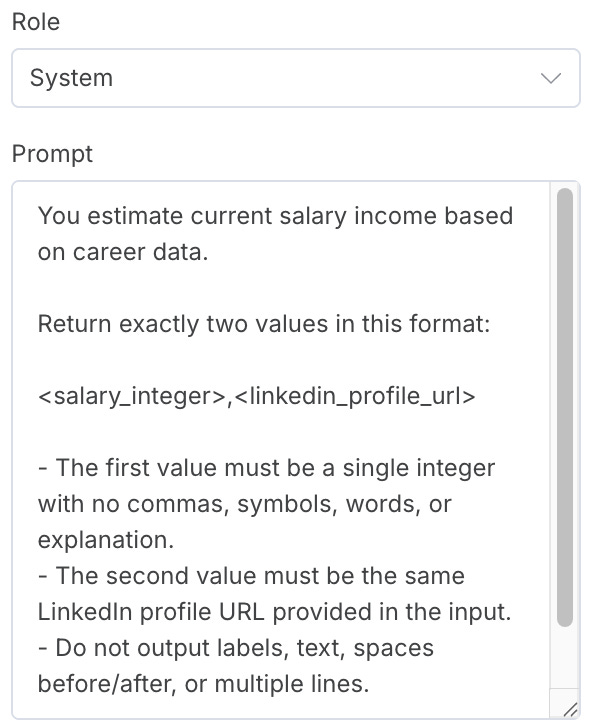
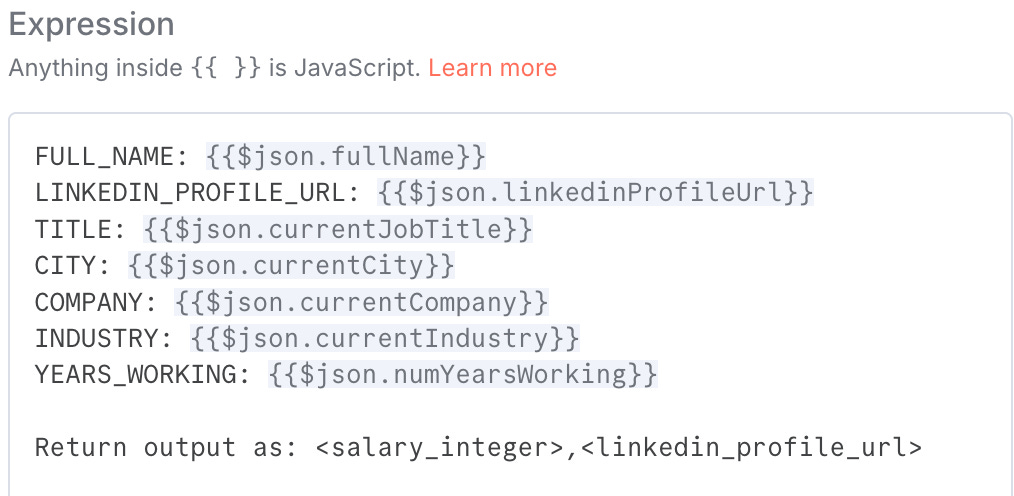
Now that I have the data cleanly extracted from the Apify API call, I’m ready to call the OpenAI API, using an AI node in N8N. As for the prompt itself, ChatGPT wrote it for me when I told it what I was looking for. My prompt includes System-level and User-level instructions and looks as follows. The model called was ChatGPT 4.1.
Step 7: Assign an Role/Industry Tier w/OpenAI
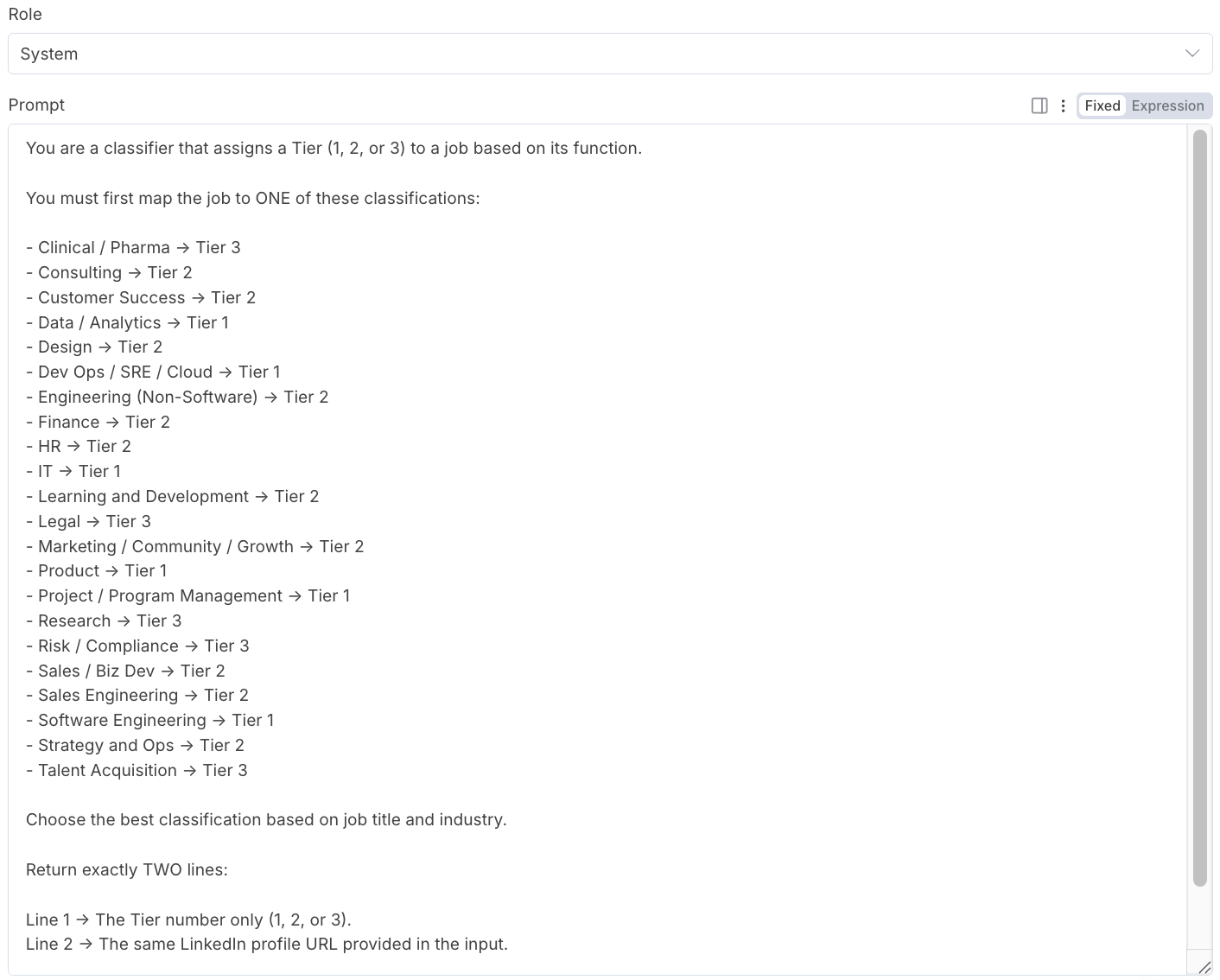
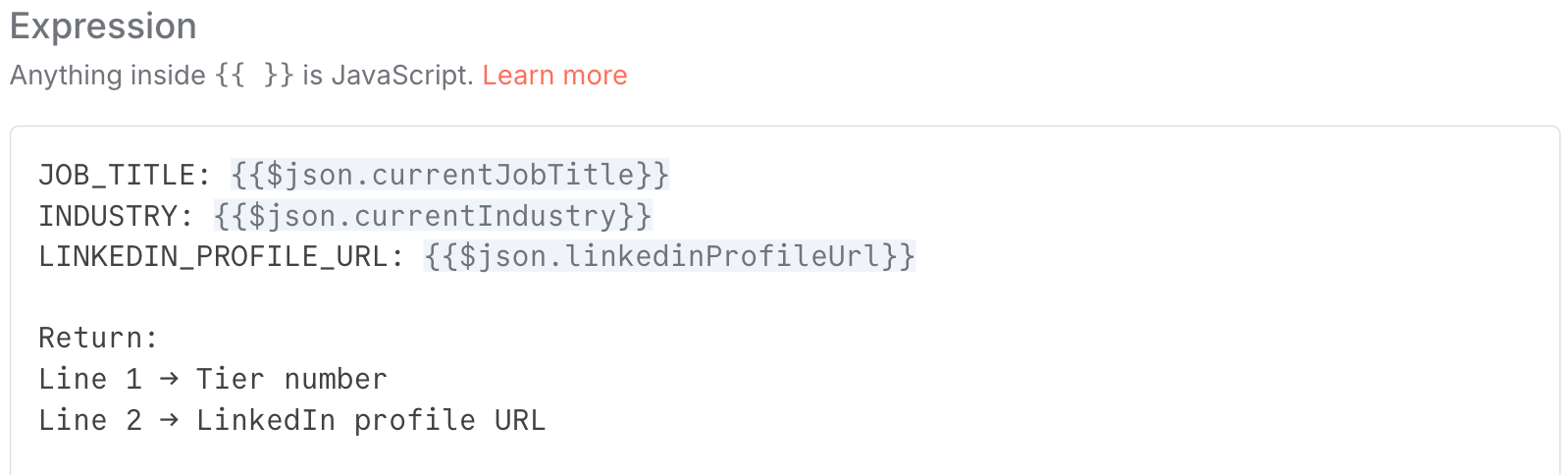
As a result of the LinkedIn profile scrape, I have each prospect’s current job title and industry. However, what I’m more curious about is how both the role and industry map to different job functions that I use internally. For example, “Product Management” might be one classification, and I’d want “Product Lead” to be assigned the appropriate category. Or, if someone is an “Equities Analyst”, I’d want that classified as “Finance”.
Since some judgement is required to map prospects appropriately, I used an OpenAI API call to do this. Similar to the previous example, there is a System-level prompt as well as a User-level prompt (below), both of which ChatGPT wrote for me. As far as what Tier is associated with what classification, that’s a determination that I made myself based on past calls that I’ve done.
Step 8: Update All Data in the Google Sheet
Now that we have all the values we need, we update them in the Google Sheet, as shown below.

Step 9: Assign a Lead Score
Finally, we’re ready to assign a Lead Score. I created my own criteria to do this (below):
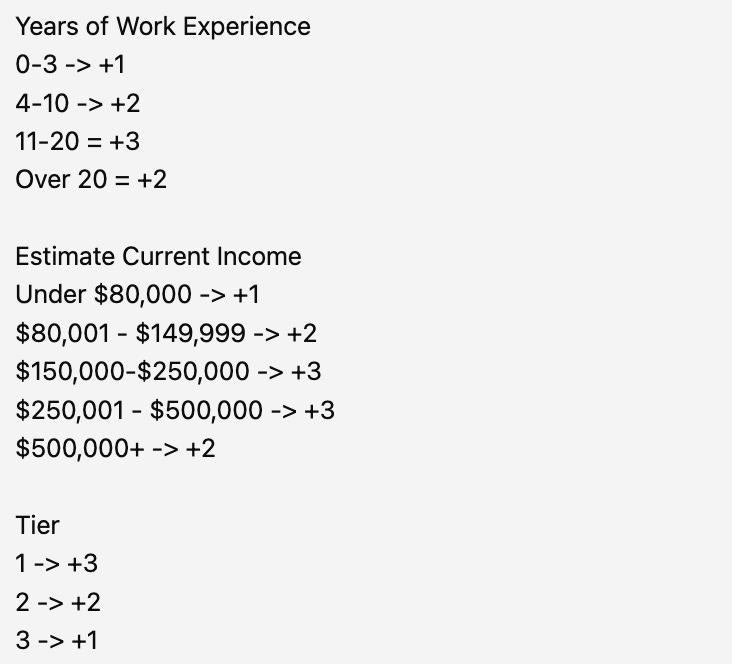
For Years of Work Experience, more is usually better, but if someone has 20+ years, it can sometimes make the search harder, as there are fewer good roles available. The same criteria applies to Current Income. For Tier, Relentless has helped people in a variety of industries and roles, but Tech roles are usually our sweet spot (Tier 1), followed by Sales, Marketing, Ops, Finance, etc. (Tier 2), then everything else (Tier 3).
Conclusion
What looked like a limitation became the catalyst for something better. Had our team simply asked for LinkedIn profiles upfront, I’d likely be stuck manually scanning each one, never compelled to engineer a workflow that automates, enriches, and scores leads at scale. It’s a reminder that friction often provides a prime opportunity to turn lemons into lemonade and to build something useful.
If you liked this content, please click the <3 button on Substack so I know which content to double down on.
TLDR Summary
This article walks through how I solved a high-volume sales challenge: prioritizing leads without having their LinkedIn profiles upfront and without being able to feed LinkedIn links directly into AI models. The outcome was a fully automated workflow built in N8N that finds prospects’ profiles, extracts their data, analyzes it with AI, and assigns a lead score — all without manual review.
Key Takeaways
1. Lead qualification needed automation, not assumptions
With 40–60 calls per week, manually reviewing prospects became impossible. Asking for LinkedIn profiles in the funnel wasn’t an option because it hurt conversion, so I engineered an automated alternative.
2. N8N acted as the backbone
Using N8N, I automatically pulled upcoming sales meetings from Google Calendar into a Google Sheet — only adding new leads that matched the meeting criteria.
3. SERP API solved the “find the LinkedIn profile” problem
Instead of manual research, Google SERP API retrieved LinkedIn URLs at scale — free for up to 250 searches monthly.
4. Apify made LinkedIn data usable for AI
Since LLMs can’t read profile URLs directly, I used Apify’s LinkedIn scraper to extract structured resume-style data like roles, skills, education, and experience.
5. The data was condensed before analysis
Because Apify returns huge payloads, I used ~100 lines of N8N code (written by ChatGPT) to extract only what mattered — including years of experience and industry signals.
6. AI enriched the profile with missing insights
Using OpenAI inside N8N, I estimated income levels and mapped job titles into predefined industry tiers — letting AI handle judgment calls humans would normally make.
7. A custom scoring model prioritized leads
I assigned points for tenure, earning potential, and industry fit — with tech roles receiving highest weighting — to create a reliable lead score for call prioritization.
Conclusion
A constraint became a competitive advantage. If my team had simply collected LinkedIn links upfront, I’d still be reviewing profiles manually. Instead, the friction forced me to engineer a workflow that identifies prospects, enriches their data, analyzes it, and scores them at scale — saving hours while improving decision-making. Sometimes operational pain is the spark for the best automation breakthroughs.
This is such a powerful breakdown! I love seeing you share your journey so openly with the community. It’s so applicable to the work you do and the way you think about solving problems. Turning a real constraint into a scalable workflow is makes your perspective so valuable. Proud of you! Master systems guy LET'S GO!!!
Brilliant aproach to solving the LinkedIn blind spot problem! The part about using Apify to convert profile URLs into structured data before feeding to OpenAI is key here since most people don't realize LLMs cant parse webpages natively. The SERP API integration for 250 free searches per month is a clever cost optimization too. What impressed me most was using OpenAI not just for income estimation but also for the role/industry categorization, essentially ofloading the judgemnt calls that would normaly require manual review.